
Also check out below articles
 13-05-2026
The new Outlook shares your data
Outlook has been the go-to choice for many individuals and businesses—including29-08-2026Report on Generative AI Features in Google Search Console
The world of artificial intelligence is constantly evolving and Google has26-05-2026Migrating a website to WordPress
Do you currently have a website built on an outdated system, or are you hitting the limits of a “free” website builder (like Wix or Weebly)? Then switching to WordPress is a smart move. With WordPress, you’re choosing complete freedom, thousands of free themes, and the best foundation for your search engine optimization (SEO).
But moving a website isn’t something you can just do on the fly; in almost every case, it requires the necessary time and preparation to ensure everything goes smoothly. If you approach the task unprepared, you risk your website going temporarily offline or losing the rankings you’ve built up on Google and other search engines.
In this article, we’ll walk you through, step by step, what you need to keep in mind when migrating to WordPress to ensure your move goes smoothly!
Preparation
Before you start taking random steps, it’s important to gather all the information in one place. For example, create a document in your preferred word processor where you describe your situation. Where is your current website hosted, what was it built with, and what pages are currently available? And so on. It’s highly recommended to jot everything down briefly and check whether you can easily export or import the content. Or whether you’ll have to create everything manually in WordPress.
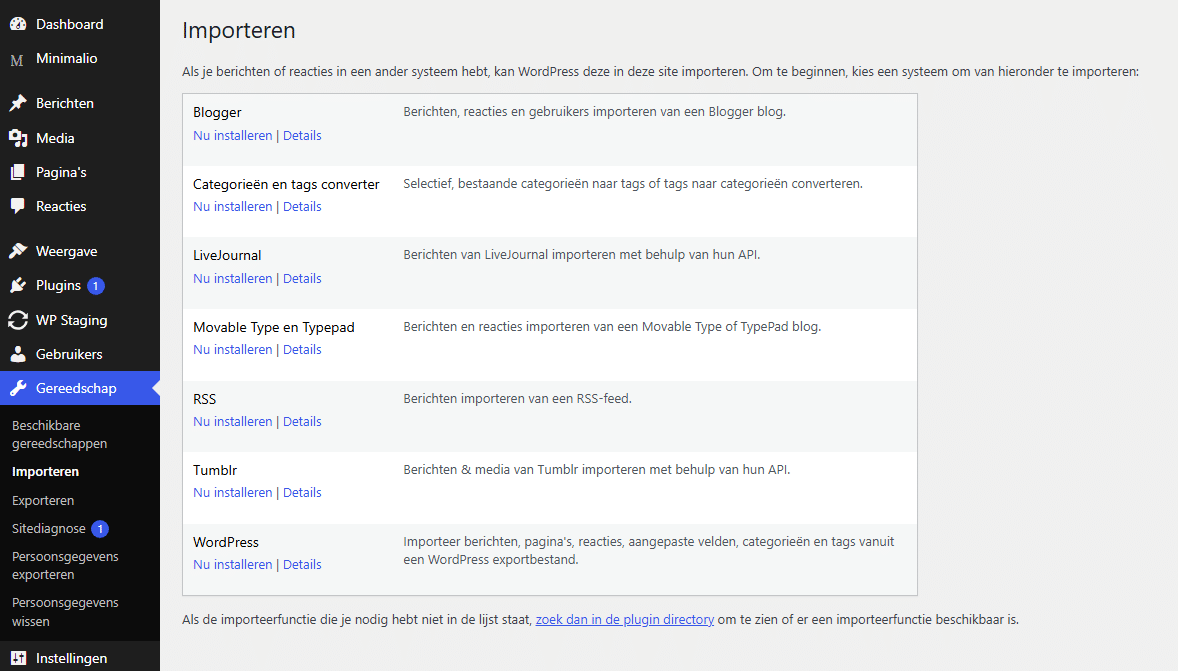
WordPress has built-in import functions for systems like Blogger, Joomla, or RSS feeds.
If you’re coming from a platform where this isn’t possible (such as a custom CMS or a simple HTML page), you’ll often have no choice but to copy and paste manually.
• Tip: First copy your text into a plain text file (like Notepad) before pasting it into WordPress. This removes the invisible, “dirty” HTML code from your old website that can ruin the layout in WordPress. Don’t forget to download your images and re-optimize them for the web.
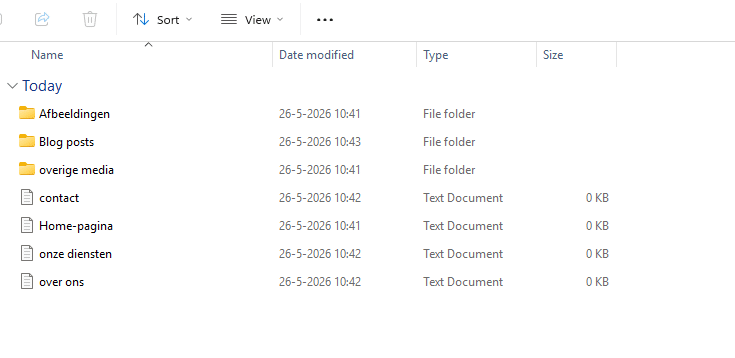
First, save all your work—including the various texts and images—in a folder on your local computer. This makes it easy to navigate all your files and insert them neatly into WordPress. It might look something like this:
In WordPress, you’ll find the import options under “Tools” -> “Import.”
Test your new website alongside the existing one
What we often recommend in this exact situation is to create a temporary subdomain where you build your new website in WordPress. You then install WordPress on a subdomain and build your new website there at your own pace. Meanwhile, your old website still exists and can continue to provide information to your visitors. This way, you can avoid the “Coming soon” page, which doesn’t really serve any purpose.
Don’t forget your email addresses!
One mistake that’s easy to make is forgetting to transfer your email address(es) during the migration. You get so focused on the website that emails can easily be overlooked. If you’re also switching hosting providers, you need to ensure that your email accounts are transferred correctly. If you don’t do this, you may lose emails as soon as the DNS settings are switched over to the new server.
The solution: Set up exactly the same email addresses in your new hosting package before you finally switch the domain name. Do you want to transfer old emails? Then use the import function in our webmail to easily transfer your emails to our servers. Stuck? You can always request help from our Helpdesk. We’re here to assist you.
No stress? Leave it to MijnHostingPartner.nl
Are you hesitant about these steps? Don’t worry. At MijnHostingPartner.nl, we understand that as an entrepreneur or hobby webmaster, you don’t always have the time or the necessary knowledge to handle this.
With our WordPress migration service, we take the hard work off your hands. We ensure that your website and emails are securely transferred to our fast hosting servers. If your content needs to be transferred manually, additional costs may apply. We will, of course, inform you of this in advance before the work is carried out.
Do you have questions about migrating your specific website? Feel free to contact our help desk via live chat or create a ticket. We’re happy to help!