 29-08-2026
Report on Generative AI Features in Google Search Console
The world of artificial intelligence is constantly evolving, and Google has now introduced a new feature for this in Google Search Console. With the introduction of AI answers and AI summaries in search results, the way people search for and find information is changing rapidly. But how can you figure out what these AI features mean for your website, your traffic, and your SEO strategy?
Good news for website owners and webmasters: Google has introduced a new report in Google Search Console: “Generative AI Features (Beta).”
In this blog post, we’ll explain exactly what this new report covers, what the numbers mean, and how you can benefit from it with your website at MijnHostingPartner.nl!
What is the “Generative AI Features” report?
When you log in to your Google Search Console account, you may already see a new notification on the dashboard when you navigate to the “Performance” section:

ℹ️ Learn more about your website’s performance in generative AI features in Google Search.
When you click “Open Report,” you’ll be taken to a dedicated section within the Performance report. This section specifically measures how often your web pages are displayed and cited in Google’s generative AI features (such as Google AI Overviews and generative search queries).
Key features in the report:
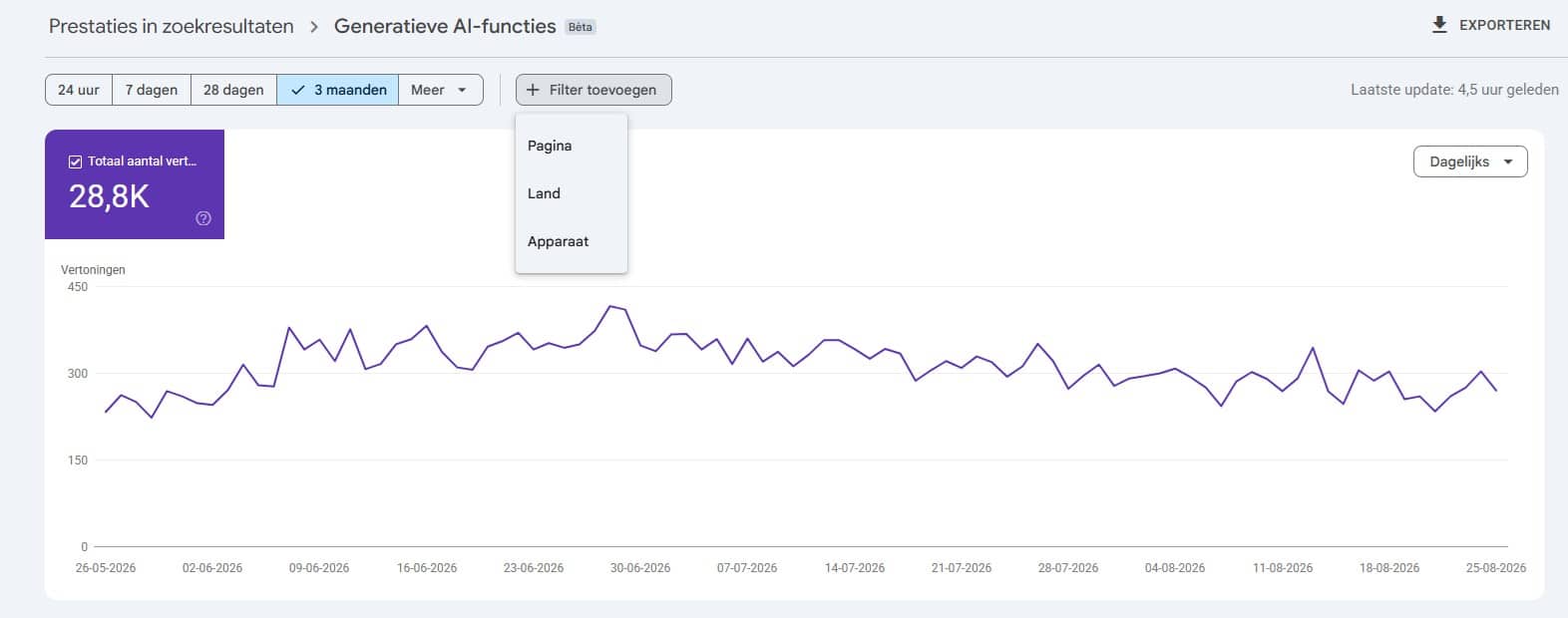
1. Impressions: You can see at a glance the total number of times your website was included in an AI-generated answer or overview. In the sample report, for example, you can already see 28.8K impressions over a 3-month period.
2. Interactive Chart: A clear visualization of daily impressions over a selected time period (24 hours, 7 days, 28 days, 3 months, or custom).
3. Filter options: You can filter the data specifically by:
Page: Which of your specific articles or landing pages are cited most frequently by Google’s AI?
Country: Which regions or countries are the search queries coming from?
Device: Do visitors primarily view the AI summaries on mobile devices or on desktop?
4. Export feature: You can easily export the data to CSV, Excel, or Google Sheets for further analysis.
Why is this important for your website?
The way search engines work is changing: Instead of displaying search results, they now provide answers directly. If Google’s AI uses your content as a source for an answer, that’s a huge quality signal.
1. Clarity on your “AI visibility”
Until now, it was pure speculation whether your articles were being used in Google’s AI answers. With this beta report, you’ll receive concrete data on how many people are seeing your brand or content through AI.
2. Insights into what works
If you filter by “Page,” you’ll see exactly which articles are particularly popular with Google’s AI. Is it a detailed how-to guide? A specific step-by-step guide? Or perhaps a clear product comparison? With this knowledge, you can create more of this valuable content.
3. SEO is evolving into GEO (Generative Engine Optimization)
Traditional SEO focuses on positions 1 through 10 in the blue links. With the rise of AI-generated answers, GEO (Generative Engine Optimization) is becoming just as important: Make sure your website is the trusted source that the AI cites and links to.
3 Practical Tips to Perform Well in Google’s AI Features
Do you want your traffic to increase in this new report? Use the following tips to ensure that Google’s generative AI selects your website as a source:
1. Provide structure and direct answers
AI models love structure. Use clear subheadings (<h2>, <h3>), bullet points, tables, and provide a direct answer to a question right at the beginning of a paragraph.
2. Ensure fast and reliable hosting
Google places enormous value on quality and user experience. A slow website is indexed less quickly as a reliable source. At MijnHostingPartner.nl, your websites run on lightning-fast SSD servers with optimal uptime, which provides an excellent foundation for strong SEO and AI performance.
3. Use structured data (Schema.org)
Help Google’s AI understand your page’s content by adding structured data (such as FAQPage, Article, or HowTo metadata). This allows the search engine to understand the context of your text even faster.
The new report “Generative AI Features in Google Search Console” is a valuable resource for anyone serious about online discoverability. It offers you direct insight into one of the most important developments in search right now.
Have you seen the notification in your Google Search Console yet? Check it out right away, find out which pages are performing well, and adapt your content strategy to the future of search!
Do you have questions about optimizing your website, or are you looking for a lightning-fast hosting environment for your WordPress or PHP site? Check out the hosting packages on MijnHostingPartner.nl or contact our chat/help desk!